Join Rabbit Trades
Two things happen here. First you get into the free community — that costs nothing and needs nothing from you. Then, when you're ready to trade live, this page walks you through opening a UEXO account and connecting MetaTrader 5, which is what unlocks the VIP channel and your deposit bonus.
Free community
Daily analysis, the full education material, the trade log and the chat. No card, no subscription, no broker account needed. Come in, watch how we work, ask questions.
- Daily supply & demand breakdowns
- The complete SNR course
- Published trade log, wins and losses
- Chart feedback from the room
VIP channel
Unlocked when you open and fund a live account through our UEXO link. No subscription fee — the partnership with the broker is how the community pays for itself, and we say so openly.
- Everything in the free community
- Tighter, higher-conviction setups
- Live trade management updates
- Direct access when you're stuck on a chart
- Deposit bonus from the broker
Before you deposit anything
We'd rather lose you as a funded member than have you lose money you needed. Go through this honestly before step one.
✅ Only risk what you can lose
Not rent, not savings you need, not borrowed money. Trading capital is money that could go to zero without changing your life.
✅ Demo for at least a month
Trade the strategy on a demo account until you can follow the rules without thinking about them. The market will still be here.
✅ Understand leverage
1:1000 leverage means a small move against a large position can wipe out your deposit. High leverage is a tool for margin efficiency, not for taking bigger bets.
✅ Check your own rules
Broker availability, leverage caps and product access differ by country. Confirm what applies where you live before you register.
✅ Know the terms of any bonus
Deposit bonuses come with conditions set by the broker — read them on the broker's own site, not from us or anyone else.
✅ Start smaller than feels exciting
Your first live month is about executing the process, not making money. Size so a losing streak is survivable and boring.
Most retail traders lose money. That is true across the industry and it will be true of some people reading this page. Rabbit Trades cannot change that, and nothing here is a promise that you will profit. If you are not comfortable losing your entire deposit, do not fund an account.
Opening your UEXO account
Around ten minutes end to end. You'll need photo ID for verification and a phone or laptop for MetaTrader 5.
Click the link
Use the UEXO link below so your account is correctly tagged to Rabbit Trades — that's what makes you eligible for the VIP channel and the deposit bonus.
Open UEXO →Register and verify
Fill in your details and complete identity verification by uploading photo ID and proof of address. Every regulated broker requires this; it's normal and it protects you.
Create a live account
In your dashboard choose Create Live Account. Set the currency to USD and leverage to 1:1000, then confirm.
Check your email
UEXO emails your MetaTrader 5 credentials — login number, password and server name. Keep this email; you'll need all three in step 7. Never share these details with anyone, including us.
Download MetaTrader 5
Get MT5 from the App Store, Google Play or the desktop download on the MetaQuotes site. This is where you'll actually place trades.
Add your account in MT5
Open MT5 → Settings → Add Account. Search for UEXO in the broker search box and select it.
Log in
Enter the login and password from your email, pick the UEXO-Live server, and tap Login. Your account balance should appear.
Fund it and message us
Deposit through the UEXO dashboard, then send us a message to claim your deposit bonus and get the VIP channel invite.
Message for VIP access →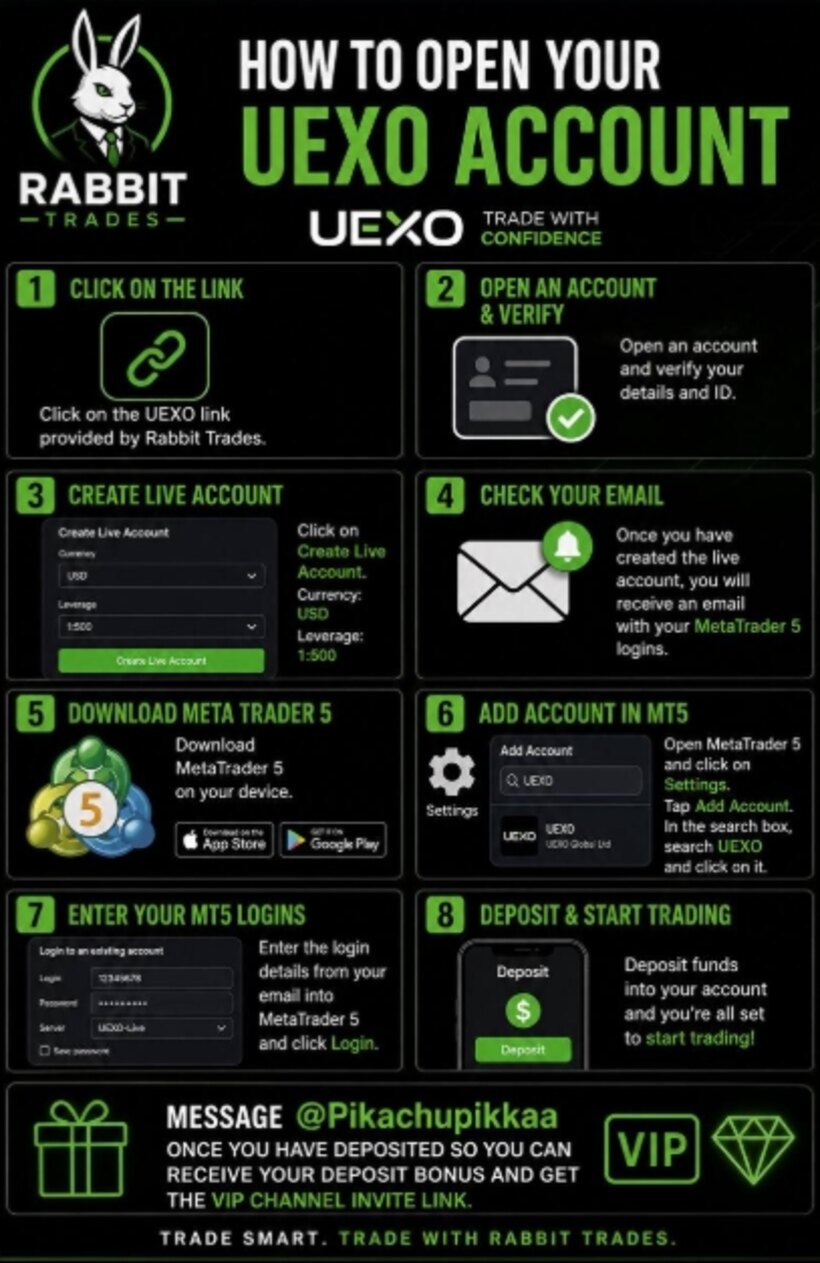
The same eight steps as a single graphic — save it to your phone and work through it while you set up.
Sign-up FAQ
Do I have to use UEXO to join the community?
No. The free group is open to everyone regardless of broker, and always will be. The VIP channel and the deposit bonus are tied to accounts opened through our link, because that partnership is what funds the community.
Do you earn money if I sign up?
Yes, and we'd rather tell you plainly than bury it. We receive compensation from the broker when members open and fund accounts through our link. It doesn't add anything to your costs. You're free to use any broker you like.
What's the minimum deposit?
Check the current minimum on the UEXO site — brokers change it. Our advice is to start with an amount you'd be genuinely fine losing, not the largest amount you can find.
Will you ever ask for my login details?
Never. Not your MT5 password, not your investor password, not your broker dashboard login, not a deposit into a personal account. Anyone claiming to be Rabbit Trades and asking for any of those is a scammer — report them and tell us.
Can I use a demo account first?
Please do. Create a demo in the same dashboard and trade the strategy on it for a month before you fund anything. It costs you nothing except patience.
Is UEXO available in my country?
Availability, leverage limits and product access vary by jurisdiction. The registration page will tell you, and you should also check what rules apply where you live before opening an account.
How long does verification take?
Usually a few hours, sometimes up to a working day if documents need review. Clear, unedited photos of your ID and a recent proof of address speed it up.
Start with the free group
There's no rush to fund anything. Come in, watch the analysis for a few weeks, work through the course, and open a live account when the strategy makes sense to you — not before.
Rabbit Trades receives compensation from UEXO for accounts opened through our link. CFDs are complex instruments and carry a high risk of losing money rapidly due to leverage.